Start Selling
We also build custom online stores and multi-vendor marketplaces with simple, integrated tools for managing inventory, pricing, and orders.
Start Selling Today

Last updated: October 18, 2026
Quick Answer
WhatsApp commerce integration SA connects a WooCommerce store to WhatsApp Business so customers can browse products, get order updates, and complete purchases inside a chat they already use daily. For South African startups, WooCommerce WhatsApp integration SA typically combines a plugin, the WhatsApp Business API, and automated messages for cart recovery and support. It works for small businesses, not just big brands, but needs careful technical setup to avoid breakdowns during busy sales periods.
WhatsApp commerce integration SA is the connection between an online store's backend (usually WooCommerce) and WhatsApp Business, allowing product browsing, order updates, and customer service to happen inside a chat thread. It works by linking the store's catalog and order system to WhatsApp through either the official WhatsApp Business API or a third-party plugin that handles the messaging layer.
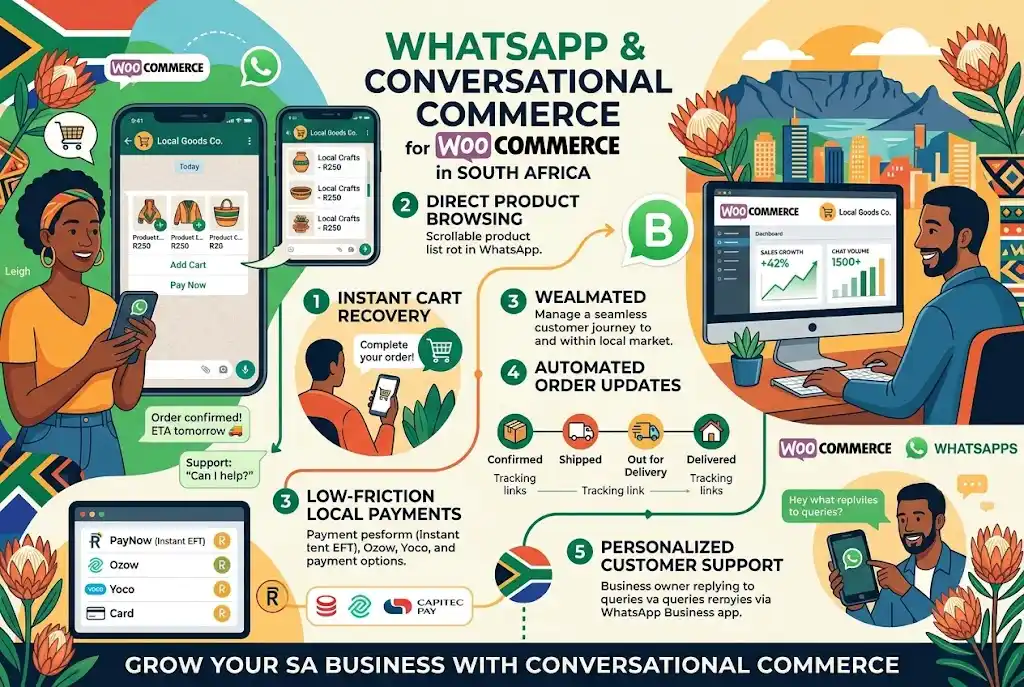
In practice, the flow looks like this:
This matters because South Africans already browse heavily on mobile, and WhatsApp is the most-used messaging app in the country. Choose this model if your customers prefer chatting over filling out web forms; skip it if your product line needs complex configuration that's easier to manage on a full website.
Setting up WhatsApp on WooCommerce in South Africa requires three core pieces: a verified WhatsApp Business account, a WooCommerce plugin or API bridge, and tested automation rules for messages and payments. Most first-time founders can get a basic version running in a week, but a fully automated setup takes longer.
Basic setup steps:
Edge case: stores selling fewer than 50 orders a month can often manage with the free plugin tier and manual replies. Stores expecting hundreds of daily chats need the official API and automation from day one, or messages will pile up and response times will slip.
Customers generally cannot complete a full card payment entirely inside WhatsApp; most WhatsApp checkout WooCommerce SA setups send a secure payment link that opens in a browser or in-app webview. The chat handles browsing, questions, and order confirmation, while the actual transaction happens on a PCI-compliant payment page.
Choose a redirect-based checkout if you process card payments and need strong security guarantees. Choose deeper in-chat flows only if your payment gateway partner explicitly supports WhatsApp-native transactions, which remains uncommon in South Africa as of October 2026 [7][10].
1. Product Browsing
2. Price Negotiation/Questions
3. Card Payment Entry
4. Order Tracking Updates
WhatsApp cart recovery South Africa works by sending an automated, personalized message to a customer shortly after they leave items in a WooCommerce cart without finishing checkout. This closes some of the gap between browsing and buying, since conversion remains low even though most adults shop online casually [12].
Best practices:
Common mistake: sending generic "you left something in your cart" texts with no product detail. Personalized messages with images and clear links convert far better than plain text reminders.
WooCommerce WhatsApp plugins South Africa pricing ranges from free basic chat-link plugins to paid monthly tools with automation, and full custom API builds for larger catalogs. Small businesses can start on the free tier; WhatsApp commerce works for solo founders and large retailers alike, with the right tool matched to order volume.
For current pricing guidance on building or upgrading a WooCommerce store suited to WhatsApp integration, see this ecommerce shop price breakdown.
South African compliance for WhatsApp commerce integration SA centers on customer consent, data protection, and verified business identity before collecting phone numbers or processing orders. Stores must get explicit opt-in before sending marketing messages and must keep customer data secure.
Key requirements:
The most common cause of a broken WhatsApp commerce integration SA setup is misconfigured API hooks or product feed sync errors that only surface under high order volume. Fixing this usually means reviewing webhook logs and re-testing payment triggers before a sale event, not after.
Frequent mistakes:
If your integration stops responding, check API connection status first, then confirm your product feed last synced correctly, and finally test a sample order end to end.
WhatsApp checkout WooCommerce SA typically supports the same payment methods already connected to your WooCommerce store's gateway, since the chat usually hands off to a secure payment page rather than processing cards itself. Common options include card payments, instant EFT, and mobile wallets.
Choose EFT or wallet options if your customer base skews toward banking apps; keep card payments available regardless, since it remains the most universally trusted option.
Is WhatsApp commerce integration SA only for large retailers?
No. Small businesses can start with free plugins and basic automation, then scale to full API integrations as order volume grows.
Does WooCommerce WhatsApp integration SA require coding knowledge?
Basic plugin setup needs minimal technical skill, but custom API hooks, product feed sync, and payment triggers usually need an experienced developer.
Can customers pay for orders entirely inside WhatsApp?
Rarely. Most setups redirect customers to a secure WooCommerce payment page rather than processing payment inside the chat itself.
How fast should a WhatsApp cart recovery South Africa message go out?
Within 1 to 3 hours of abandonment, with a product image and direct link back to the cart, for the best response rate.
What causes WhatsApp commerce integration to stop working?
Expired API tokens, broken product feed syncs, or unhandled traffic spikes during sales are the most common causes.
Are there compliance rules for collecting WhatsApp numbers in South Africa?
Yes. Businesses need customer consent before messaging and must store collected data securely.
What does WooCommerce conversational commerce SA cost to set up?
Costs range from free (basic plugin) to several thousand rand for custom API builds with AI recommendations and automated recovery flows.
WhatsApp commerce integration SA gives South African startups a practical way to meet customers where they already spend time chatting, while WooCommerce WhatsApp integration SA handles the backend product and order logic. The approach works for small stores and large brands alike, but the technical layer, namely API hooks, product feed sync, and secure payment triggers, needs careful setup to survive busy sales periods without breaking.
Next steps: start with a verified WhatsApp Business account and a basic plugin, test cart recovery messages on a small customer segment, and only move to a full API build once order volume justifies the investment. For guidance on building a WooCommerce store ready for this kind of integration, review the ecommerce shop price breakdown or learn more about the team behind this guidance before committing to a technical partner.
Tags: WhatsApp commerce integration SA, WooCommerce WhatsApp integration SA, WhatsApp cart recovery South Africa, WooCommerce conversational commerce SA, WhatsApp checkout WooCommerce SA, ecommerce South Africa, WhatsApp Business API, conversational commerce, abandoned cart recovery, online retail trends, small business ecommerce, mobile commerce